
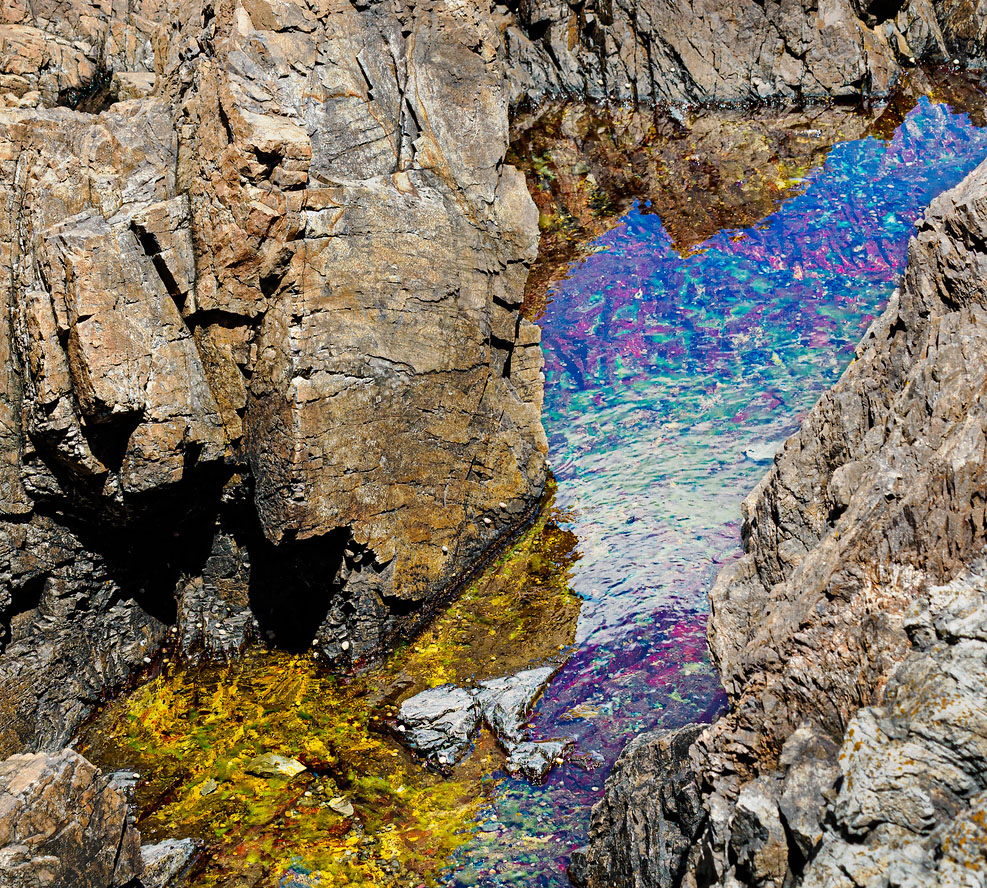
Much of the New England coast is granite, but parts have other. more interesting igneous rock. I've recently gone a few times to a rocky point that has some of these, which are varied in color and are striated. They are fascinating to look at but (at least for me) hard to put into an interesting image. Here's one try: a tidal pool surrounded by what I think is rhyolite. Is there enough there? Other comments?
 Helpful Posts: 0
Results 1 to 9 of 9
Thread: Tidal pool
-
20th June 2026, 05:37 PM #1


- Join Date
- Dec 2011
- Location
- New England
- Posts
- 9,299
- Real Name
- Dan
Tidal pool
-
20th June 2026, 05:57 PM #2

- Join Date
- Apr 2015
- Location
- Ottawa, Ontario, Canada
- Posts
- 1,618
- Real Name
- André
Re: Tidal pool
As a first quick glance, I think that you might have too much in that frame. I'm curious how it would look with just a sliver of rock at the top end of the pool and maybe loose a little bit off the left side as well.
I don't understand what is creating the strange colours in the top half or so of the pool. You might be able to use those colours to advantage.
I will download your photo and experiment when I have a chance.
As you said, challenging but I think well worth the effort.
-
20th June 2026, 06:11 PM #3
- Join Date
- Jan 2009
- Location
- South Devon, UK
- Posts
- 14,889
Re: Tidal pool
My thoughts are similar to Andre. What is the intended subject?
There is a large lump of rock on the left side which, to me, looks like the rear view of a monster, and it tends to dominate the scene. So maybe a bit of cropping from the left side and top would concentrate the scene on the pool.
-
20th June 2026, 06:21 PM #4
- Join Date
- Apr 2015
- Location
- Ottawa, Ontario, Canada
- Posts
- 1,618
- Real Name
- André
Re: Tidal pool
Here is a very quick first go. Beside the crop, I darkened the rocks and dodged the pool.
See if this is a direction that looks promising to you.
-
20th June 2026, 07:52 PM #5

- Join Date
- Jan 2020
- Location
- Calgary, Alberta, Canada
- Posts
- 557
- Real Name
- Len
Re: Tidal pool
An interesting image. After looking at it for a while I am inclined towards Andres' interpretation. I wonder about the 2 deep shadows under the overhangs on the left side. Perhaps they could be dodged a little to show some detail?
Last edited by LenR; 20th June 2026 at 08:00 PM.
-
21st June 2026, 01:03 PM #6
- Join Date
- Dec 2011
- Location
- New England
- Posts
- 9,299
- Real Name
- Dan
Re: Tidal pool
Thanks, all, for the quick replies.
There are two issues: specifics, and the general question of whether there's enough there there.
Re specifics: I agree with the idea of cropping and darkening some of the rocks. Re the black areas: I'm stuck. I was shooting under bright mid-day sun, and I opted to focus stack (2 images) rather than exposure bracket. Given that it was handheld, I couldn't do both. That was a mistake, made worse by the fact that my OM-1 II, which is what I was using, has a good stop less DR than my R6 II, which was at home.
Re the dodging of the tidal pool--Andre, I'm guessing I know why you tried it, but that change I wouldn't make. I think it detracts from the color and tonal range of the original.
That gets me to something like this quick additional edit:

But that leaves the big issue: is there enough there there? Maybe not.
-
21st June 2026, 07:29 PM #7
- Join Date
- Apr 2015
- Location
- Ottawa, Ontario, Canada
- Posts
- 1,618
- Real Name
- André
Re: Tidal pool
I agree with you. I wonder if it might look better if I had used "curve" layers in luminosity mode rather than "multiply" and "screen" layers. Originally Posted by DanK

-
Yesterday, 12:26 PM #8
- Join Date
- Dec 2011
- Location
- New England
- Posts
- 9,299
- Real Name
- Dan
Re: Tidal pool
Interesting question. They work very differently, as you know. Originally Posted by Round Tuit
I rely on luminosity blending quite a bit. For example, I use it much of the time when I use unsharp mask to add local contrast. Lightroom now has what is in effect a continuous luminosity=>normal control under its curve tool, and I use that some as well.
I use the multiply blend mode mostly when I have areas that are so bright that burning doesn't work well. It also works in some cases to bring out detail in bright areas.
I haven't really learned to use the screen blend mode effectively.
-
Today, 03:50 AM #9New Member

- Join Date
- Jun 2026
- Location
- New York
- Posts
- 8
- Real Name
- Connect Infosoft
Re: Tidal pool
This is really amazing, the variety of textures together with the unexpected colors of the water gives a painting like a feeling. perhaps getting a little closer or adding some context would be helpful, but there definitely is enough to capture one’s attention here.


 Reply With Quote
