
 Helpful Posts:
 I'm trying to gain a better understanding of using the curves tool to set the black point in the image.
From this tutorial I understand that if I have unused tonal range in the image I can take the black point on the curves tool and drag it towards the right along the x-axis to set a truer black?
https://www.cambridgeincolour.com/tu...hop-curves.htm
For images that do not have a true black in them, does one just use their best judgement on the true colour, ie; say of a bird?
And when one lifts the newly set black point, up a little is that lightening the dark tones (Shadows) in the black point set? And vice versa when one lowers that new black point.
Thank you.
Results 1 to 20 of 24
-
7th January 2014, 06:43 PM #1


- Join Date
- Jul 2011
- Location
- British Columbia, Canada
- Posts
- 7,244
- Real Name
- Christina
Setting the Black Point using the Curves Tool to Achieve True Colour Representation
-
7th January 2014, 07:30 PM #2

- Join Date
- Dec 2009
- Location
- WNY
- Posts
- 36,716
- Real Name
- John
Re: Setting the Black Point using the Curves Tool to Achieve True Colour Representati
Christina, Originally Posted by Christina S

In the tutorial it looks like the white/black points are only adjusted when you have unused tonal range in the image.
-
7th January 2014, 07:37 PM #3
- Join Date
- May 2012
- Location
- northern Virginia suburb of Washington, DC
- Posts
- 19,064
Re: Setting the Black Point using the Curves Tool to Achieve True Colour Representati
Imagine a photo of a white wall. You wouldn't want anything to appear black. Similarly, you may have other images in which you wouldn't want anything black.
Any time you raise any point on the curve upward, you are remapping the original tone to be a lighter tone.
-
7th January 2014, 09:31 PM #4Moderator


- Join Date
- Mar 2012
- Location
- Ottawa, Canada
- Posts
- 22,456
- Real Name
- Manfred Mueller
Re: Setting the Black Point using the Curves Tool to Achieve True Colour Representati
Christina - I virtually always do a black point (and white point) adjustment, if the image has black and white parts in the image. If your histogram does not extend all the way to the black or white side, adjusting your black point to where there is “meaningful data” will give your image more “pop”. The darker gray values will become blacker and increase the overall contrast in the image. Moving the white point will turn the lighter gray areas whiter. Just make sure that you don’t blow out the highlights and shadow detail when you do so. Don’t forget some other adjustments can influence this adjustment and you may have to back off a bit to prevent this from happening.
Be careful with your white point if you are planning to make prints; the white colour comes from the paper base and there is not ink deposited if the white setting is greater than around 245, leaving some funny looking patches on the print.
I tend to use the black and white sliders in ACR, rather than using curves to do this. I will apply an appropriate curves adjustment over and above the black and white adjustments to give me the contrast I want in my images.
-
7th January 2014, 09:55 PM #5
- Join Date
- Jul 2011
- Location
- British Columbia, Canada
- Posts
- 7,244
- Real Name
- Christina
Re: Setting the Black Point using the Curves Tool to Achieve True Colour Representati
Thank you Manfred. I find your explanation very informative and helpful, and practical, too!
Originally Posted by GrumpyDiver
-
7th January 2014, 10:09 PM #6
- Join Date
- Dec 2008
- Location
- New Zealand
- Posts
- 17,660
- Real Name
- Have a guess :)
Re: Setting the Black Point using the Curves Tool to Achieve True Colour Representati
Echoing Manfred's workflow. Just keep in mind that it's a "serving suggestion" only; many (most) images will have black and white points set, but the exact amounts don't depend on any fancy mantra -- it's simply a case of "just do what makes the image look best".
The only rule is "there are no rules".
For landscape I'll often cut the markers slightly into the histogram; having a theoretically correct black point (ie touching the histogram) isn't the same as one that's visually correct. Often you need to cut into the range more so that the black areas become visually apparent.
For people shots, both points are normally driven by the point at which loss of detail becomes undesirable, although usually I'll increase the exposure 1 stop in ACR and then lower the brightness to bring skin back into line -- gives a much nicer treatment to skin.
-
7th January 2014, 10:22 PM #7
- Join Date
- Jul 2011
- Location
- British Columbia, Canada
- Posts
- 7,244
- Real Name
- Christina
Re: Setting the Black Point using the Curves Tool to Achieve True Colour Representati
Thank you Colin! Also very helpful and practical!
Originally Posted by Colin Southern
-
7th January 2014, 11:23 PM #8
- Join Date
- Dec 2012
- Location
- Alaska
- Posts
- 7,604
- Real Name
- Dan
Re: Setting the Black Point using the Curves Tool to Achieve True Colour Representati
I always follow these type discussions with interest and invariably pick up something even if I don't have anything (additional) to contribute. For example I had somehow never seen the tutorial that Christina linked explaining the curves tool. I have to say it is the best written explanation I've seen on the topic.
So thanks, Christina, for the thread and thanks to CIC once again for providing top flight information.
-
8th January 2014, 12:06 AM #9
- Join Date
- Dec 2009
- Location
- WNY
- Posts
- 36,716
- Real Name
- John
Re: Setting the Black Point using the Curves Tool to Achieve True Colour Representati
In a landscape the blackest black might be only a shadow, and the whitest white might only be a highlight. If your blacks/whites are in the background and are difficult to adjust using pointing device or eye dropper do you bother setting those points?
-
8th January 2014, 12:08 AM #10

- Join Date
- Aug 2012
- Location
- S, B'ham UK
- Posts
- 3,337
- Real Name
- John
Re: Setting the Black Point using the Curves Tool to Achieve True Colour Representati
I would go along 100% with Colin's point - no hard and fast rules. The problem with setting a black point with curves is that it can be very sensitive so an eye dropper type setting is easiest if there is one. Basically it's used by picking a point in the shot that is black and really making it black or very near to that. Loosely put the idea is that there is no contrast there to see any detail so it may as well be black. The net effect is to increase contrast as it is then black and the rest of the tone line is steeper.
One way of gauging it is to look at the luminosity or even the rgb etc histogram. Your original image was something like this

There is "unused" space at the dark end to the left and not much visual information as the graph height is low.
I used the black slider in rawtherapee to adjust it as it has one and it's easier to adjust than the curves in that package. The histogram in the other packages curve I showed is rather yuck. The slider has moved the histogram to the left. and the contrast changes are clearly shown by the change in height along the graph.

There is a need to watch the histogram and the image when playing with this but the histogram gives a good indication of what can be done. It's possible to use local retouching to bring some of the dark parts back up later if needed but only a little as there is very little visual information there. One problem a lot of people have in that area is that when you looked at the scene the detail could probably be seen easily. The poor old camera doesn't have as much dynamic range especially in shadows without using HDR type techniques so compromises have to be made or the lighting changed.
 I sometimes mention that rawtherapee can be downloaded and used for free. The curves display in that is fairly small so adjustments need care but the black slider makes that aspect easy when it's needed.
  I'm not on commission from them by the way.
The GIMP's cloning tool is easy to use. It's click on a point in an area to copy across and then paint to another point. The source area is copied across as the mouse is moved. with various options. I believe CS does this in a similar fashion.
John
-
-
8th January 2014, 12:32 AM #11
- Join Date
- May 2011
- Location
- SE Michigan
- Posts
- 4,511
- Real Name
- wm c boyer
Re: Setting the Black Point using the Curves Tool to Achieve True Colour Representati
FWIW...I don't heed the black/white points, preferring instead to use my bastardized version of the zone system. Something akin to these numbers: Zone 1 – 0, Zone 2 – 28, Zone 3 – 50, Zone 4 – 80, Zone 5 – 118, Zone 6 – 162, Zone 7 – 207, Zone 8 – 243, Zone 9 – 255.
Last edited by chauncey; 8th January 2014 at 12:40 AM.
-
8th January 2014, 12:53 AM #12
- Join Date
- Jul 2011
- Location
- British Columbia, Canada
- Posts
- 7,244
- Real Name
- Christina
Re: Setting the Black Point using the Curves Tool to Achieve True Colour Representati
John... I'm trying to learn more about curves so I'm not sure but Colin seems to think it is important.
John (UK) Thank you as always for a helpful and educational reply. Yes, I noticed how sensitive and dangerous the curves tool can be, the adjustment needs to be very light or it can wreak havoc on an image. Thanks for the tips on the other programs but right now learning Lightroom and Elements and even Adobe Photoshop (eventually) is just about all I can handle.
WM Boyer - I adore your photos. Are the numbers you quote from your years of experience and good ball park figures for all the zones, or are you just having fun?
-
8th January 2014, 02:59 AM #13
- Join Date
- Dec 2008
- Location
- New Zealand
- Posts
- 17,660
- Real Name
- Have a guess :)
Re: Setting the Black Point using the Curves Tool to Achieve True Colour Representati
For what it's worth, I set the clipping points in ACR with the sliders (exact names depend on process version), or in Photoshop with a levels layer or command. You can do it with curves, but I find curves are easier to manage once the clipping points have already been set.
-
8th January 2014, 03:00 AM #14
- Join Date
- Dec 2008
- Location
- New Zealand
- Posts
- 17,660
- Real Name
- Have a guess :)
Re: Setting the Black Point using the Curves Tool to Achieve True Colour Representati
I'm confused. Originally Posted by chauncey
(pretty normal for me).
If you set an area to Zone 1 then you're in essence setting the clipping point at that time. Same for Zone 9.
-
8th January 2014, 03:29 AM #15

- Join Date
- Aug 2012
- Location
- New York NY USA
- Posts
- 459
Re: Setting the Black Point using the Curves Tool to Achieve True Colour Representati
I would agree with Colin about setting clipping points using Levels, which gives a usable histogram display that lets one see about where a black threshold and white threshold might start to bring the tonal range of the image more in line with the available tonal space in which it is displayed. I'll often set my black point more or less last, after I've done everything else and so I won't inadvertently push tones into pure black that should just be very dark.
In reality, the question as to where one should put the black and white points of an image is relative to the image itself, and how one wants to present it. Pure black, the absence of all light, is a rare thing; but all system based upon some sort of sensitometry has thresholds of resolution beyond which no information can be gathered. the eye responds to light dynamically, more sensitive in low light and less sensitive in bright light; and digital cameras too will display differing sensitivity depending upon the ISO and other exposure parameters being used.
So, what is "black" you ask?
Here's a photo where there is a lot of black; but, in different tonalities of black. In order to show different shades of black, I might not set any black point at all; but if there is a black point, it is in shadow somewhere as a true absence of light:

On the other hand, this image might not have any true black areas in the original capture; but in editing the photograph, I might decide to just ignore what happens in darker areas knowing that the real issue is going to be how the facial features of the performer are defined and distinguished. It doesn't matter what recedes into black throughout the image as long as the performer's face emerges clearly:

Similarly, I might want to show the feather detail in an area of black plumage on, say, a Canada goose. With some captures, this might mean leaving the black point well below where the first tones appear on the histogram of the image, so that different shades of black are apparent in the plumage; but with other captures, if there are large areas of background which are blacker than that plumage, you might need to set the black point higher and drop a lot of that background into pure black in order to get the black plumage to show properly.
So it isn't just about where to set the black point: it is about deciding what "blacks" you want to appear dark, and what areas you are will to have disappear completely. On the one hand, there are the blacks you are editing for because you want to keep them; and on the other hand, there are the areas you are willing to let drop below the threshold of visual resolution because you don't really need them anyway and doing so lets you emphasis areas you want to direct the viewer's attention toward.
-
8th January 2014, 04:09 AM #16
- Join Date
- Dec 2011
- Posts
- 321
Re: Setting the Black Point using the Curves Tool to Achieve True Colour Representati
The CiC tutorial is good, but Curves is really intended for changing the gamma correction of the mid tones, thus changing the apparent contrast. Black and white points are better set by watching the histogram.
-
8th January 2014, 08:51 AM #17
- Join Date
- Dec 2008
- Location
- New Zealand
- Posts
- 17,660
- Real Name
- Have a guess :)
Re: Setting the Black Point using the Curves Tool to Achieve True Colour Representati
Agreed Originally Posted by Richard Lundberg
Not really - watching the image is a better guide.Black and white points are better set by watching the histogram.
Take this image for example;
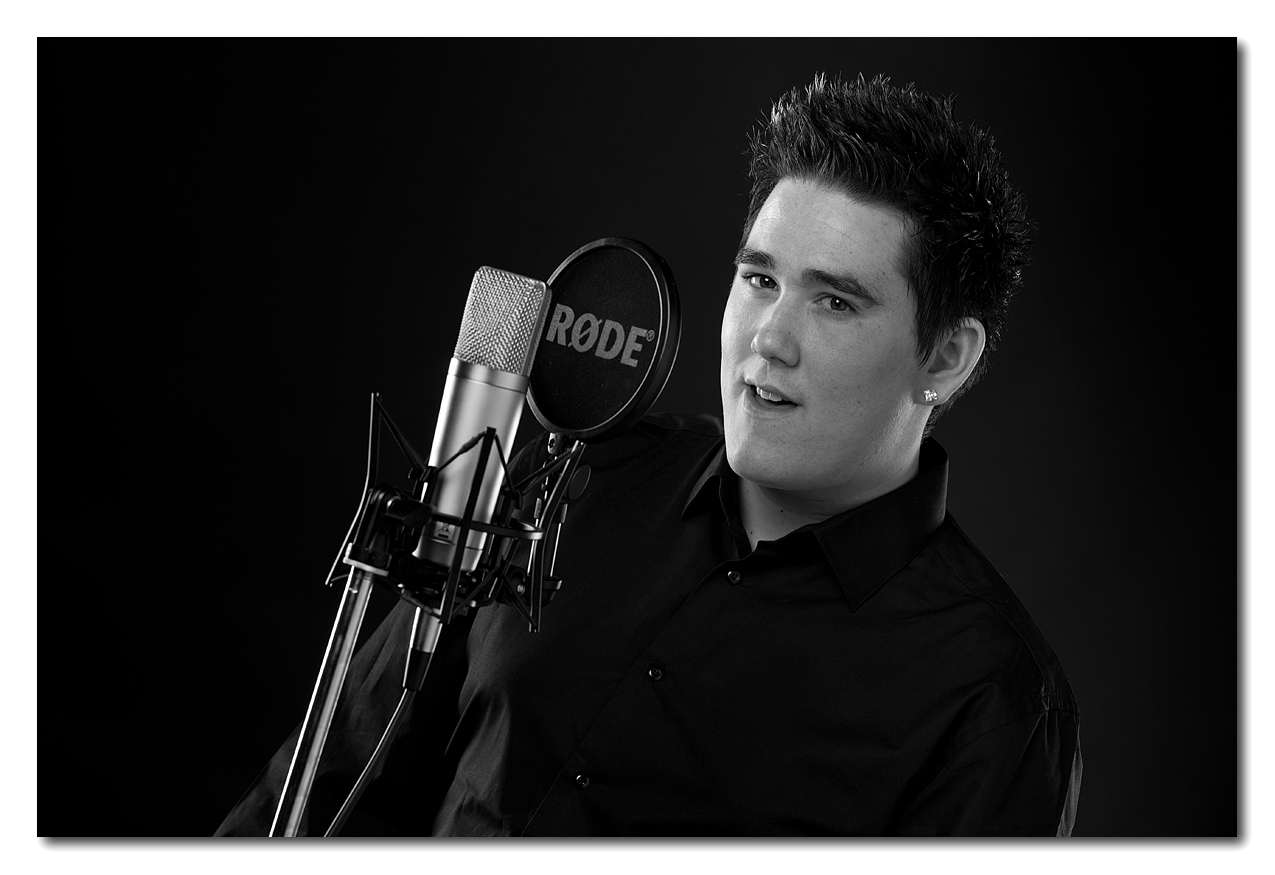
Here we've got a black shirt that's flirting dangerously close to the tones of the black background (I deliberately hit the subject with more light than the background) (thank you light meter!). If I'd adjusted this image using only the histogram then not all of the background would have been clipped to black. Adjusting it by looking at the image, I could navigate the fine line between the shirt being a dark dark gray in places and the background being black.
When processing, the histogram can tell you when something had hit zero, but it can't give you any indication of how that looks visually; case in point - sometimes I'm just touching the end of the histogram - other times I'm about 8 points in - other times 16 or more points in (generally for canvas printing one has to force the contrast quite aggressively because the canvas still has quite a high black point even after being sprayed (typically about 17) (-v- about 4 for paper).
-
8th January 2014, 11:59 AM #18
- Join Date
- Aug 2012
- Location
- S, B'ham UK
- Posts
- 3,337
- Real Name
- John
Re: Setting the Black Point using the Curves Tool to Achieve True Colour Representati
Glad some one mentioned levels for setting the black point however what form of levels control. The one I have used has 3 pointers on the tone scale - black level, mid grey ( I assume) and white point. I assume because I have never managed to get to grips with it. In fact the one I use also has input range - the 3 pointers and output range 2 pointers, possible values 0 to 255.
Also a button marked edit these values using curves. The idea is to set the black pointer and white pointer as the user wishes and then adjust the mid grey pointer as desired. Actually I can use it now and there is also a reset button for when things get messed up. Also eye droppers so that the points can be selected from the image. Under some circumstances curves is far more flexible. I hate the use of gamma here as it could be confused with sRGB gamma. Minuscule changes to that will make large differences and some packages do allow it to be adjusted. Curves are tone curves. Confusing the 2 just makes it harder to communicate effectively. Raw conversion curves are tone curves so are camera jpg conversion curves.
There has been several posts showing that selecting a black point isn't always the right thing to do. Fine but not much help here. Going back to the original image it's flat and the histogram shows that there is little to no visual information at the dark end so there is no harm in removing that and mapping the tone levels into the image in a different fashion. Levels, black slider or tone curve it doesn't matter really.
The usual tone curve demo shows just the use of s curves. Basically one or both end of the curve have there slope reduced this increases the slope through the rest and boosts contrast in that range at the expense of compressing the tonal range at one or both of the ends - sometimes bad news as the dark end for instance may already be a bit compresses because of the few bits of rgb it uses. In some cases all of the bright end might not be used so compressing it isn't a problem. Same with the dark end. The histogram always gives a clue to what might be done. When a black point is selected all that is happening is that the compression at that end is complete. The slope of the tone line up to it is zero so no contrast at all.
Tone curves can be used in all sorts of ways. A curve like this can be used to lift up dark areas of shots. Often a problem if they were taken with many compacts but the same thing can happen with dslr's and it can be very effective working from jpg's as well as raw..

The aim is to bring up detail in dark areas and achieve an "over all flat look" and then modify that by other means such as contrast and brightness. This shot isn't really a decent demo but notice there is more detail in the dark area on the other side of the water - just. all of a sudden it;s a picture postcard too.

John
-
-
8th January 2014, 12:39 PM #19
- Join Date
- Aug 2012
- Location
- S, B'ham UK
- Posts
- 3,337
- Real Name
- John
Re: Setting the Black Point using the Curves Tool to Achieve True Colour Representati
In case some one searches this out later the black point control can be used for other things as well. Say a raw file has to use an s curve so that highlight have to be compressed so clouds loose their realism or yuck some one want HDR in capital letters. It's possible to generate a low exposure from the raw file such as this and then blend it into the other to restore the clouds to how they should be. Curves can be used to black out everything but the clouds and enhance the tonal range of the bits that need blended in. eg

The same thing can be done at the dark end. Guessing what the outcome will be and how dark or light to go is great fun. Colours can also be interfered with. A lot of that goes on. Want a red sky well make it red etc.
John
-
-
8th January 2014, 01:33 PM #20
- Join Date
- Jul 2011
- Location
- British Columbia, Canada
- Posts
- 7,244
- Real Name
- Christina
Re: Setting the Black Point using the Curves Tool to Achieve True Colour Representati
Thank you to all for the very informative replies. I'm delighted that I asked this question because the replies have provided me with a better understanding of adjusting the white and black points, the tools to do so, and also of the why.
John Morton, your images and explanation is truly wonderful. Thank you.
Colin, thank you for the extra details and visuals.
John, thank you very much for the detailed explanation and how-to's accompanied by the visual graphs. Immensely helpful to my understanding, and yes, I see how moving the black point up the axis brought out the detail and improved the image immensely. A big thank you to you!

 Reply With Quote