
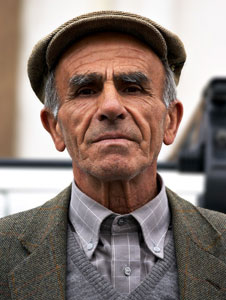
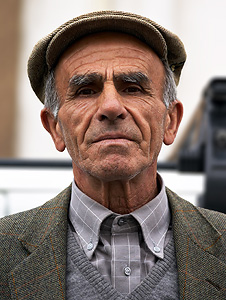
I seem to have trouble when trying to tune the amount, radius and threshold parameters in Photoshop CS2 Unsharp Mask to get the same "sharpened" result as shown in the tutorial:
Sharpening Using An Unsharp Mask.
Could it be possible that the "sharpened" version is really the original picture, and that the "original" version is a blurred one from that? because I highly doubt that the fine texture on his clothes could be recovered from the blury version.
or could someone here post a set of parameters for Photoshop CS2 Unsharp Mask to achieve that ?
 Helpful Posts: 0
Results 1 to 6 of 6
-
23rd April 2008, 10:13 AM #1New Member

- Join Date
- Apr 2008
- Posts
- 3
about the picture of the old man in tutorial "unsharp mask"
Last edited by McQ; 4th March 2009 at 11:36 PM.
-
23rd April 2008, 03:20 PM #2Administrator
- Join Date
- Apr 2008
- Location
- California, USA
- Posts
- 1,473
- Real Name
- Sean
Re: about the picture of the old man in tutorial "unsharp mask"
Sorry for any confusion; this example did not intend for the viewer to try and replicate the steps using the softer online image. This is primarily because sharpening was not applied to the online JPEG, but was instead applied to a more detailed TIFF (which was then compressed to show the online JPEG). Trying to sharpen the JPEG will make compression artifacts much worse, and will not bring out anywhere near as much detail.
I have updated these images to include an unsharpened JPEG that makes the process more replicable. Give it a try. The unsharp mask settings for the result you see are 400%/0.2/0 for the amount/radius/threshold.
-
24th April 2008, 08:42 AM #3New Member
- Join Date
- Apr 2008
- Posts
- 3
Re: about the picture of the old man in tutorial "unsharp mask"
Thanks for your clarification!
-
23rd April 2011, 09:40 AM #4New Member
- Join Date
- Apr 2011
- Posts
- 2
Re: about the picture of the old man in tutorial "unsharp mask"

-
23rd April 2011, 09:47 AM #5New Member
- Join Date
- Apr 2011
- Posts
- 2
Re: about the picture of the old man in tutorial "unsharp mask"

-
23rd April 2011, 10:23 AM #6
- Join Date
- Mar 2009
- Posts
- 2,522
Re: about the picture of the old man in tutorial "unsharp mask"
Eleonora, I do believe this is CiC first. You have got the images onto the forum but not the text
 Must of us do it the other way around. A beautiful animal but he put me off my sausage sandwich. They are far too fattening anyhow...so you have done me a favour
Welcome to CiC by the way. I look forward to your questions relating to the images above

 Reply With Quote