
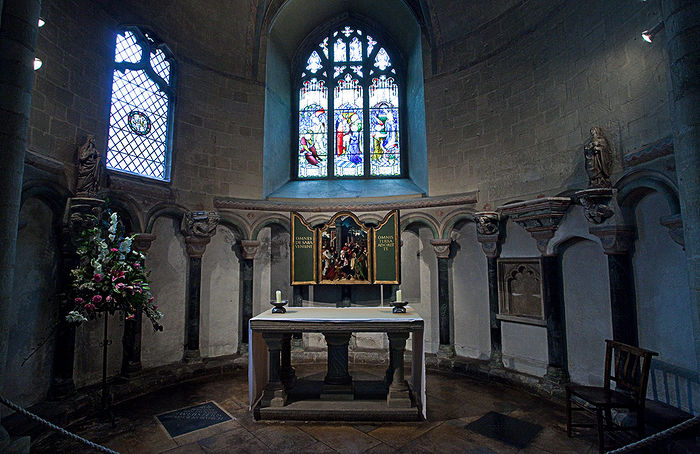
These two shots confuse me. The first has the colour balance set by the camera, on auto, at the scene which was a mixture of natural light through plain and stained glass and the interior lights. The second has been adjusted using the white altar cloth so should be correct but I prefer the first. So, is the correct white balance how I should always process images?
 Helpful Posts: 0
Results 1 to 9 of 9
-
4th November 2009, 08:52 PM #1

- Join Date
- Apr 2009
- Location
- Essex, UK
- Posts
- 605
- Real Name
- Peter
Colour balance - auto vs manual examples - which is correct?
-
4th November 2009, 09:23 PM #2
- Join Date
- Dec 2008
- Location
- New Zealand
- Posts
- 17,660
- Real Name
- Have a guess :)
Technically Correct can be different to Visually Correct
Hi Peter,
Having the white balance "technically correct" can often be different from being "visually correct"; sunsets and stained glass are two good examples.
Case in point - if you shine a light through a red piece of glass onto a white cloth then you'd EXPECT the cloth to look red. So "technically correct" works great in situations like portraiture and mid-day landscape (ugh!), but "visually correct" is better in situations like this.
-
5th November 2009, 01:48 AM #3

- Join Date
- Sep 2009
- Location
- Burton on Trent, UK
- Posts
- 4,788
- Real Name
- Steve
Re: Technically Correct can be different to Visually Correct
I like the second one. But I've been taking a few photo's in churches recently and find every angle and position has a different white balance.
-
5th November 2009, 01:54 AM #4

- Join Date
- Jan 2009
- Location
- Hudson Valley, U.S.A.
- Posts
- 299
- Real Name
- Jack
Re: Colour balance
I personally like the warmth of the 1st image, #2 looks kinda sterile and cold for a church.
Just my 2 cents worth.
Jack
-
5th November 2009, 04:46 AM #5

- Join Date
- Jul 2009
- Location
- Massachusetts
- Posts
- 343
Re: Colour balance
Auto WB works fairly well in many outdoor situations and 90% of most situations, but it is calibrated more for daylight temperatures. Thus the warmer tones when shot indoors with artificial lights. The best and most accurate method (at the time of shoot) is to do a "custom white balance".
You can use a blank sheet of white copier paper, digital grey or white cards, or accessories as an Expodisc.
Playing with the WB give "mood" to an image and your choice in setting the mood. Warmer or cooler, richer in or less contrast.Last edited by Amberglass; 5th November 2009 at 04:47 AM. Reason: add
-
5th November 2009, 09:39 AM #6
- Join Date
- Oct 2009
- Location
- Auckland NZ
- Posts
- 47
Re: Colour balance
My Penneth worth> How do you recall seeing it? As warm in #1 or cooler as in #2. If you shoot in raw you can play round with the WB and get it how you like.
Now, do you like your beer warm or chilled, your curries hot or mild? Do you want fries wth that?
Howard
-
5th November 2009, 12:40 PM #7

- Join Date
- Oct 2009
- Location
- Northamptonshire, UK
- Posts
- 409
- Real Name
- Steve
Re: Colour balance
Excuse the question/comment from an absolute novice but the interior lights appear to be focussed on the Alter Cloth that was used to set the custom WB. So could this be why it has thrown it out when the shot is taken of a wider area?
-
5th November 2009, 01:19 PM #8Moderator

- Join Date
- May 2008
- Location
- Windsor, Berks, UK
- Posts
- 16,759
- Real Name
- Dave Humphries :)
Re: Colour balance
Exactly Steve! Originally Posted by stevewe88

It is mixed light, there is no right answer for a wide shot like this.
From a personal satisfaction viewpoint, Howard has the right idea, but obviously anyone else viewing it won't have the benefit of memory, particularly if not viewing it in a series of shots to establish a 'norm'.
Form a practical viewpoint for stills; quick and easy = make it monochrome
Or replace colours in PP, or merge two individually CT corrected layers for best effect.
I used to work in TV OB (Outside Broadcasts) many years ago and we obviously needed 'wide shots'.
To get anything like this right we either;
a) put gel on the windows to match the daylight to the tungsten (or whatever) illumination inside, OR
b) used our own specially rigged daylight balanced lamps (HMIs)
For churches and cathedrals, etc., b) was the usual method because the windows were big and the installed lighting inadequate for TV production anyway.
But for small rooms, or even those commentary boxes with the presenter in front of a window showing the sports stadium/pitch/whatever outside, a) was usual because tungsten lamps were the norm in those days. In this instance there was always an ND element to it too, even if you had HMI studio lights, to balance the dynamic range.
Cheers,
-
5th November 2009, 04:22 PM #9
- Join Date
- Oct 2009
- Location
- USA - California
- Posts
- 445
Re: Colour balance
Exactly right. Originally Posted by Dave Humphries
If you are unsure of of which tempeture to ballance, here are a few tips:
1. Dual-process the RAW file and combine it in photoshop so (to the best of your abilities) the entire scene becomes ballanced
2. Ballance the scene to the subject (not so helpful for a wide shot)
3. Ballance the scene to the dominating light source (good for wide shot)
4. If the lights are setup where the front/key light is one tempeture, and the shadows are another tempeture, ballance for the key light (This is really a cine technique).
This is all, of course, based on the assumption you want a ballanced scene!


 Reply With Quote