
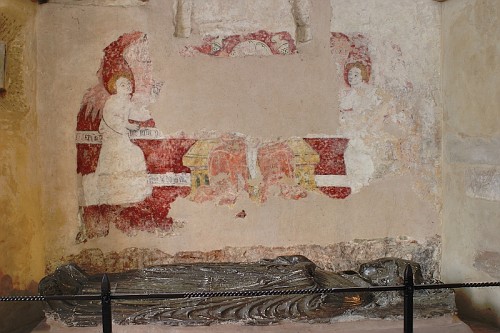
I've tried to set the colour balance in this without much success. Initially I made the mistake of pointing the camera away to take the balance off a grey card; my mind is like mud sometimes.
I found this on the internet probably taken with a flash.
http://www.mikekemble.com/daytrip/li...ichfield45.jpg
Generally I would like to know how to set custom colour balance for say the moon; do I turn the camera pointing away from the moon to get the light on the card, or what?
 Helpful Posts: 0
Results 1 to 9 of 9
-
22nd October 2009, 12:42 PM #1


- Join Date
- Sep 2009
- Location
- Burton on Trent, UK
- Posts
- 4,788
- Real Name
- Steve
How do you set colour balance in the dark
-
22nd October 2009, 01:48 PM #2

- Join Date
- Dec 2008
- Location
- West Virginia
- Posts
- 1,222
- Real Name
- Jim
Re: How do you set colour balance in the dark.
Here's a nice tutorial on photographing the moon.I have photographed the moon,but don't have any examples handy.Setting WB to daylight works fine for moon shots.
http://www.astropix.com/HTML/I_ASTROP/SETTINGS.HTM
-
22nd October 2009, 05:22 PM #3
- Join Date
- Aug 2009
- Posts
- 2,342
- Real Name
- Steve
Re: How do you set colour balance in the dark.
Set it on auto and take a sample shot.....................then look at your RGB histograms. When the right side of each is even the WB is neutral. My camera has a WB shift feature. Just shift it where you like it. Originally Posted by arith

Last edited by Steve S; 22nd October 2009 at 05:32 PM.
-
22nd October 2009, 07:38 PM #4
- Join Date
- Sep 2009
- Location
- Burton on Trent, UK
- Posts
- 4,788
- Real Name
- Steve
Re: How do you set colour balance in the dark.
I didn't think of that; good idea and certainly better than a guess, and, I like the info about the moon shot since I like taking photo's in the dark. Originally Posted by Steve S
When I can get up
-
23rd October 2009, 12:23 AM #5

- Join Date
- Jul 2009
- Location
- Massachusetts
- Posts
- 343
Re: How do you set colour balance in the dark.
You can also set your camera's WB on K for Kelvin and adjust from there from cooler to warmer. If you use the WB shift feature, make sure you put it back to the original settings.
-
23rd October 2009, 03:21 AM #6
- Join Date
- Dec 2008
- Location
- New Zealand
- Posts
- 17,660
- Real Name
- Have a guess :)
Re: How do you set colour balance in the dark.
Thought of the moment - on the 1Ds3 you can do this with LiveView - presumably other Canon LiveView models as well (although pretty much just as easy to adjust afterwards with a RAW converter). Originally Posted by Amberglass
-
23rd October 2009, 10:31 AM #7
- Join Date
- Dec 2008
- Location
- New Zealand
- Posts
- 17,660
- Real Name
- Have a guess :)
Re: How do you set colour balance in the dark.
Just a couple of thoughts -- white balancing adjusts the colour in a shot so that it's as if the illuminant is pure white light - but there's often a big difference between what's technically correct and what's visually correct; the classic being a portrait taken by candle light - you'd expect the light from a candle to be yellowish - so you wouldn't want to white-balance it. Originally Posted by arith
With regards to the moon - I imageing that if it's in full view on a clear night then it's colour temperature wouldn't change - so hopefully someone could come up with the exact temperature that could simply be dialed in.
Update: a quick "google" suggested a colour temp of around 4000 to 4125 Kelvin.
-
23rd October 2009, 11:02 AM #8
- Join Date
- Sep 2009
- Location
- Burton on Trent, UK
- Posts
- 4,788
- Real Name
- Steve
Re: How do you set colour balance in the dark.
These are RAW and is HDR for noise reduction. They are put into picturenaut which generates a TIFF file. It is this I try to adjust white balance on. Originally Posted by Colin Southern
But that was wrong and now I adjust the RAW to make TIFF, but this means manual adjustment of settings and is a nuisance.
This is what came out, but with one hot pixel removed which I shouldn't do with a painting but well.
-
12th November 2009, 11:35 AM #9
- Join Date
- Jul 2009
- Location
- Kolkata - INDIA
- Posts
- 537
Re: How do you set colour balance in the dark.
Image is over saturated.,and lacks contrast.... desaturate and duplicate the layer, change the mode to SOFT LIGHT., in colour balance reduce some red and within 10 sec this is the final pircture... Originally Posted by arith
Last edited by Ashwin; 12th November 2009 at 07:36 PM.


 Reply With Quote
