
"Yesterday I had several of my image files sent to a photo printing shop for printing. When I got the printed photos I noticed that some of the objects (plants), when looked green on my monitor, become yellowish green on photo paper.
I believe this is caused by the difference in color ranges on different devices (monitor vs photo printer in my case). I just want to know if there is a way to get around this (for example, adjusting the color properly before sending an image file for printing)."
-- The reason that I put quotes around the paragraphs above is that I in fact posted the same text in another forum, but don't seem to get a satisfactory answer there.
One advise I got says that I need to do a hardware calibration for my monitor first, in order to ensure the color profile is right. Well I agree. But as a DSLR beginner and casual photo shooter, I really don't think I should spend that money and extra effort at this moment. My thinking logic goes like this:
1) I believe my camera (a Canon XSi/450D) delivers the right colors.
2) I'm happy with the colors I see on my 3-year old monitor -- although there might be some deviation from what is real, but my eyes can hardly tell the difference.
3) So it might just be the printer "mis-interprets" the colors in my file and hence the "wrong" appearance, and I have no control over the way the printer works.
I understand that color management is a VERY complicated subject, and for the time being I can't afford to buy an ink-jet photo printer to have a better control. I'm just wondering if there is any good way to get around this problem.
 Helpful Posts: 0
Results 1 to 4 of 4
Thread: Color difference when printed
-
11th May 2008, 03:42 AM #1

- Join Date
- May 2008
- Posts
- 17
Color difference when printed
-
11th May 2008, 04:38 PM #2Administrator
- Join Date
- Apr 2008
- Location
- California, USA
- Posts
- 1,473
- Real Name
- Sean
Re: Color difference when printed
I think you are right in suspecting that the printer is likely the largest source of color error. Also, from your description of the error it seems to be just a color cast issue as opposed to this green color necessarily being out of the gamut of your printer. Which printer are you using? Here's some example color gamuts for printers ([COLOR=DimGray]gray) compared to sRGB ([COLOR=White]white) and Adobe RGB 1998 ([COLOR=Black]black)
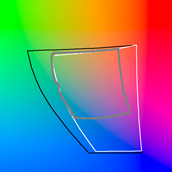
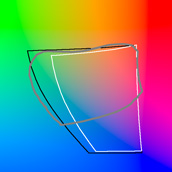
left: fuji frontier (typical walmart/costco/etc printer), right: high-end inkjet printer
(both at 50% luminance for comparison)
There are two ways to go about solving this color problem: (i) the systematic color profiling option or (ii) the quick and dirty guess and check method. If you just need OK results quickly, then the crude guess and check method might be satisfactory. Try experimenting with different combinations of default/manufacturer color profiles for your printer (if available), along with a few different types of paper for each profile tested (sounds like a likely cause in you case). Sometimes you can also find non-manufacturer profiles for your printer on the internet with a quick search.
If you need more accurate results, ultimately the best thing to do when serious about using a particular printer (and something I always do) is to have a custom color profile made. This typically runs $30-50 if you want to have it professionally done, and has to be performed separately for each type of paper you intend to use. It will nearly always produce superb color and black and white prints, even on lower end printers. Do a quick search for "printer custom color profile" and you will find several good options. You will need to print out one of their standard color targets on each paper you intend to use, mail these to them, and most will send you back the printer color profile(s) by email.
If you are performing editing on your computer and want fine color control, having your monitor profiled is also very important, but from your description it seems like your large color deviation is less from the monitor than it is from the printer. A hardware monitor calibration device typically runs around $200-300 for a model that should be fine for your purposes. A couple that come to mind are the ColorVision Spyder or GretagMacBeth Eye-One Display. More expensive hardware calibration devices can also create printer color profiles, however these are often much more expensive, produce inferior results and are primarily useful when you have many, many different paper/printer combinations to profile.
-
12th May 2008, 09:30 AM #3
- Join Date
- May 2008
- Posts
- 17
Re: Color difference when printed
Just a short feedback. My problem is gone when I used another photo shop for the print service. This shop now gives me more or less the same colors as what I see on my monitor.
Maybe the combination of photo paper and chemicals doesn't go well at the first shop. I don't know.
Thank you again for your time and patience.
-
12th May 2008, 07:25 PM #4Administrator
- Join Date
- Apr 2008
- Location
- California, USA
- Posts
- 1,473
- Real Name
- Sean
Re: Color difference when printed
Yeah, sounds like that was the likely problem. In my original post I had incorrectly assumed that you were using your own printer for this (even though you had said "photo printing shop"). In that case it's much much easier, because it is really their responsibility. Depending on the lab, you can have them re-profile/calibrate their printer. This is something that has to be done routinely for most high-throughput printers. Alternatively, just get a refund (which it sounds like you should not have a problem doing with the color cast you got) and experiment with somewhere else!


 Reply With Quote
