
Nearly every architectural project I shoot requires some exposure blending to optimize. I've tried HDR (photomatix, but prefer Artizen HDR)/layer masking/luminance masking, and spent countless hours tweaking results, which have never been as good as I would have liked. Now I use TuFuse Pro. The search is over. It does take time to master, but the results speak for themselves. Still in beta but you'd hardly know it. Take the trial for a run.I'm unaffiliated, but have been a long time fan of Max Lyons work.
 Helpful Posts: 0
Results 1 to 11 of 11
-
1st May 2008, 09:33 AM #1

- Join Date
- May 2008
- Location
- Berkeley CA
- Posts
- 23
Automated Exposure Blending Software
-
1st May 2008, 05:38 PM #2Administrator
- Join Date
- Apr 2008
- Location
- California, USA
- Posts
- 1,473
- Real Name
- Sean
Re: Automated Exposure Blending Software
Welcome to the forums DanielJ! Yes, I have used Max's PTAssembler for quite some time, and was quite excited to see that he was adding lots of ambitious new features, such as automated photo blending, in his next release.
-
1st May 2008, 05:38 PM #3

- Join Date
- Apr 2008
- Location
- Philadelphia
- Posts
- 93
- Real Name
- Elie
Re: Automated Exposure Blending Software
Thanks for the TuFuse Pro link DanielJ!
It seems to me like photomatix has been dominating the HDR software;
It is always nice when good alternatives are available.
Elie
-
1st May 2008, 08:59 PM #4
- Join Date
- May 2008
- Location
- Berkeley CA
- Posts
- 23
Re: Automated Exposure Blending Software
Photomatix and Optipix from Reindeer Graphics were two of the first programs to address automated exposure blending. Artizen HDR takes up where they left off with an array of tonemapping options (Lock06 is wonderful) that don't have the telltale halos and lack of local contrast we've come to expect from HDR software (don't let the Artizen HDR homepage fool you, it's a characterisitic look that the Fattal tonemapping operator, ala Photomatix, yields, not necessarily characterisitic of Lock06 and the others. If it's true HDR one is after I suggest giving Artizens trial a run. My bent has always been realism and believeability, TuFuse and a little time is the closest I've come. I wouldn't be surprised to see it make it's way into camera firmware in some manifestation.
-
2nd May 2008, 04:02 AM #5
- Join Date
- Apr 2008
- Location
- Philadelphia
- Posts
- 93
- Real Name
- Elie
Re: Automated Exposure Blending Software
Hey DanielJ,
Thanks for that information.
I just attempted to buy Artizen but failed! I will try again tomorrow.
I read some reviews about Artizen HDR and everyone seems to be raving about how is surpasses Photomatix and pther HDR utilities.
-
3rd May 2008, 01:25 AM #6
- Join Date
- May 2008
- Location
- Madrid (Spain)
- Posts
- 169
Re: Automated Exposure Blending Software
Hi Daniel, I had the same problem as you and was not satisfied with the weird tone mapping results produced by common HDR software (Photomatix, HDR PS,...), so I designed my own blending routine with the goal in mind of mixing RAW files of different exposure but without altering at all the original image parameters (tone and contrast). Originally Posted by DanielJ

It's then up to the user to apply a manual tone mapping to enjoy the full captured DR. I do this using 2 curves: masked bright increase to lift the shadows + overall contrast, plus a local contrast enhancement using unsharp mask. I am obtaining my first images and I am quite happy with the results. This scene including windows open to a sunny outdoor was about 11 f-stops of real DR. It could be captured noise free with just 2 shots 4EV apart using my 350D:

I called my program 'Zero Noise' since it primarily focus on optimising noise reduction, which is the basis for DR expansion: Zero Noise. The v1.0 version is coming soon but the beta v0.91 works quite well.

Regards.Last edited by _GUI_; 3rd May 2008 at 03:41 PM.
-
4th May 2008, 04:16 AM #7
- Join Date
- May 2008
- Location
- Berkeley CA
- Posts
- 23
Re: Automated Exposure Blending Software
Guillermo, this is fascinating stuff! I spent a good deal of time reading (and puzzling) over the robotically translated documentation and was able to work through my first result image. It was not so good
, but I don't give up easily! Clearly proper white balance is critical. The documentation leaves me unclear on why 'Auto' is inappropriate, is it that the WB changes with exposure within the same bracketted set? Would it be possible to allow the program to initiate WB via the 'camera WB' and tell the program to SET that WB for the remaining bracketted shots? The test images I used were from a 40D, I input the recommended -13823- saturation value manually, but the result image was not recoverable.
Have you a support forum somewhere in the world, I sense a wave of questions coming.
You've really got a great start with ZN, thanks so much for sharing it with us!
EDIT:
Well Guillermo, I just reread the tutorial and retested with a couple images of my livingroom at night, including incandescent lamps and darkness at the end of an unlit corridor. I propped up a grey card as well. I have to say, I'm thoroughly impressed. The only time was spent tweaking the luminance curve, not hard at all, to get the masked area and non masked area around the lamp to agree in relative brightness. When I consider how much time I'd spend processing difficult RAW files in preparation of such a blend, the task of blending them, and still have considerable shadow noise, the value of your program becomes all the more evident.Last edited by DanielJ; 4th May 2008 at 08:46 AM.
-
4th May 2008, 10:48 AM #8
- Join Date
- May 2008
- Location
- Madrid (Spain)
- Posts
- 169
Re: Automated Exposure Blending Software
Hi Daniel, first thanks for trying this piece of software. I understand it's far from an 'all in a click' application. Glad to see you read the whole tutorial (not everyone does before trying the app) and corrected your camera's saturation point and managed to apply the curves for tone mapping. I plan to translate properly the tutorial when I have time.
What you say about the AutoWB has the problem I am not reading EXIF info nor DCRAW is passing my program any info so that it cannot know camera's auto WB from the first image and apply to all. However you can ask ZN to calculate auto WB for you: just set a patch covering the whole image, that should give similar results to camera's auto WB. In the WB calculation I made a mistake not to discard saturated pixels (I will correct that in v1.0) so don't choose for this the most exposed images in your set but some with no important areas clipped.
If you have problems with some scene just send me the RAW files and will try to do my best. At the moment ZN is very demanding with the perfect alignment of images; I am planning to improve that with anti-ghosting and allowing some progressive blending in certain areas.
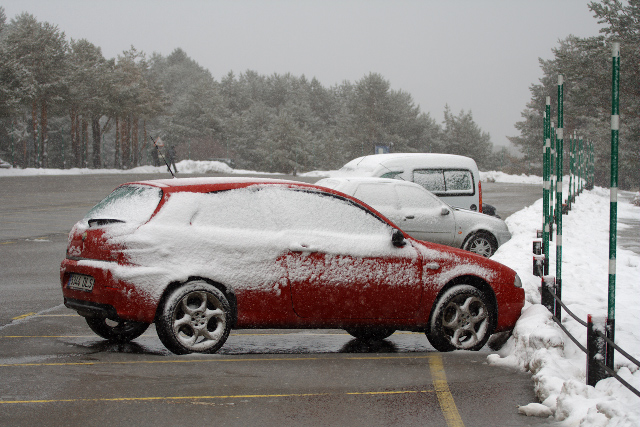
I am concerned about the WB issue and want to improve it adding Temp/Tint control since not always scenes contain some white or neutral area. I am even using ZN as a simple front end for DCRAW; ZN balanced properly the snow on my car here some weeks ago:
BR
PS: why not show your tests here?
This is another user's test on his living room, with a 30D. He used 4 shots 2EV apart:
Calculating relative exposure...
1.tiff: 1 (+0 EV)
2.tiff: 4,17 (+2,06 EV)
3.tiff: 17,06 (+4,09 EV)
4.tiff: 69,78 (+6,12 EV)
DONE
Resulting image before tone mapping:

Quick tone mapping with 2 curves:

Noise comparision in the shadows between resulting image and least exposed shot (the only one which preserved the highlights in the set):
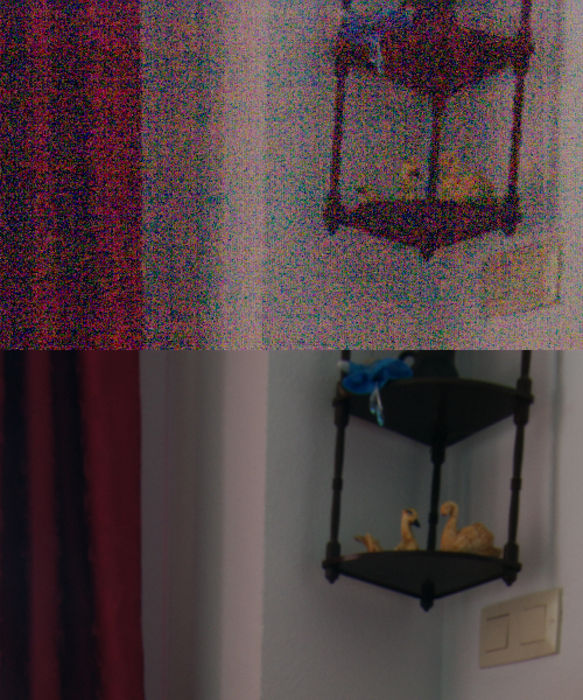
Real captured DR: 13 f-stops (measured with Histogrammar over the linear resulting TIFF):

Last edited by _GUI_; 4th May 2008 at 11:46 AM.
-
9th May 2008, 12:12 PM #9

- Join Date
- Apr 2008
- Location
- Cheshire and Dumfries & Galloway
- Posts
- 732
- Real Name
- David
Re: Automated Exposure Blending Software
Hi DanielJ I've followed your lead to TuFuse Pro and it looks a powerful piece of software. However, despite installing DCRaw, apparently the correct version and apparently in the correct system folder, I cannot get TuFuse Pro to read and process my RAW files (Canon .CR2 files). Have you encountered this? Any tips before I follow it up with TuFuse Pro's author? Originally Posted by DanielJ
Thanks
David
-
22nd August 2008, 02:10 PM #10
- Join Date
- May 2008
- Location
- Madrid (Spain)
- Posts
- 169
Re: Automated Exposure Blending Software
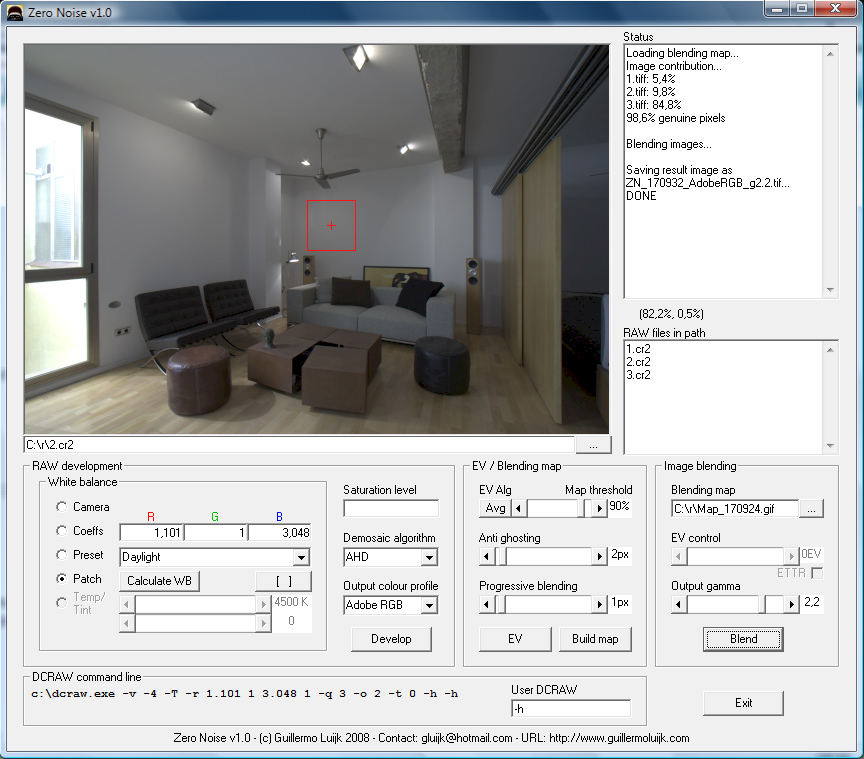
I already posted this in LL. These days I could relax and add some features in Zero Noise:
- Concept of "blending map": a GIF map file represents now which images are the pixels taken from. This map can be manually edited to perform a personalized blending.
- Possibility to do progressive blending with a radius parameter
- Anti-ghosting feature with radius parameter to minimise artifacts in presence of moving elements (leaves, water) in the scene and also when alignment is not perfect
- The process has been divided into 4 stages: Development, Relative exposure calculation, Blending map generation and Blending. Each stage can be re-run with new parameters without the need to recalculate any previous stage. This allows for instance user intervention to align images after development, or blending map fine tuning in PS after blending map generation
- Each stage gives an important amout of statistical info about the process such as absolute and relative exposures of each image, % contribution of each image to the result, % genuine pixels (pixels coming from one single image)
- New algorithm for relative exposure calculation based on median rather than on average (as until now), that will be more robust against moving parts of the scene
- For those familiar with DCRAW, any DCRAW command can now be included in the workflow (at your own risk)
Blending map (in black those pixels coming from the most exposed shot, gray medium exposure shot and white least exposed shot):

200% crop of previous blending map (upper lamp): up without anti-ghosting nor progressive exposure (like ZN worked until now), down with 4px anti-ghosting radius plus 3px progressive blending radius.

200% crop (ground lamp) on how ZN seeks most exposed areas to obtain them from less exposed shots. With real tone pixels coming from the most exposed shot, in green tones blending map showing pixels coming from the medium and least exposed shots, with a progressive area in the borders where information from more than one shot gets combined:

I will try to upload the update when it is 100% ready before my vacation (I will visit NY/Boston next month).
-
11th June 2009, 11:22 PM #11New Member
- Join Date
- Jun 2009
- Posts
- 1
Re: Automated Exposure Blending Software
sadly, there is a nasty watermark in zero noise

 Reply With Quote
