
With the talk about removing backgrouns with loose hair and the new Topaz Plugin, I looked at a Gimp approach.........also due to Donald, David interest.....
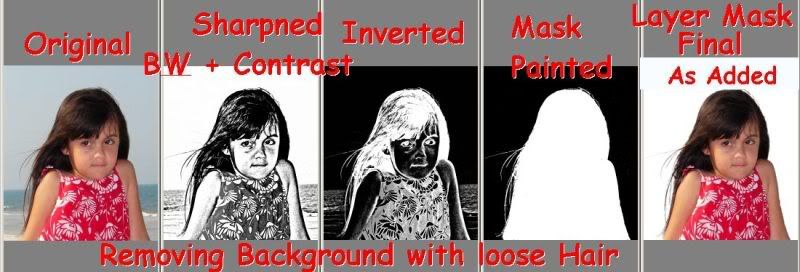
The following is a rough outline of the steps......
Using G’MIC to create Mask for Removing Background….
* Open Image – Add Alpha Channel
* Duplicate Layer
* Open G’MIC and select Enhancement Unsharp Mask
Set Radius to 1 and Amount to 5, and Select OK….
* Open G’MIC and select Colors-Black and White
Set Contrast at 2.0 and Gamma 1.5 Select OK….
* Open G’MIC and again select Unsharp Mask
Set Radius to 1 and Amount to 5, Select OK….
This further darkens the small hair……
* Select Colors Invert to the top layer
* Select Colors Threshold and move right to 255…..this is the the basic mask….
* Add new Transparent Layer…you should now have an easy job to identify areas
you wish to retain….
* Paint in White on this new layer for areas to be retained, Black to remove….
You may wish to lower opacity to better see what to paint
Be careful to leave the white wisps of hair….
* Gaussian Blur this layer perhaps at 10….this is the final mask……
* Select All and Edit Copy this layer….to insert as your mask…..
* Delete the top 2 layers leaving only the background layer….
* Select Layer-Mask-Add layer Mask….
* Select Layer Mask and Paste….Then anchor pasted section
* Add White or other colored Layer….Move behind the Background Layer
* Save as XCF or flatten and save as JPG
* Finish any additional Post Processing such as blurring, sharpening, color balance
Good Hunting.................
 Helpful Posts: 0
Results 1 to 5 of 5
Thread: Gimp/G'MIC Background Removal
-
17th October 2009, 06:47 PM #1

- Join Date
- May 2008
- Location
- Pittsburgh PA, St. Augustine FL
- Posts
- 136
Gimp/G'MIC Background Removal
Last edited by willgoss; 17th October 2009 at 07:39 PM.
-
17th October 2009, 08:47 PM #2Moderator

- Join Date
- Feb 2009
- Location
- Glenfarg, Scotland
- Posts
- 21,402
- Real Name
- Just add 'MacKenzie'
Re: Gimp/G'MIC Background Removal
Biggest problem is keeping up with all the new information now flooding in. It's wonderful. In learning overload mode.
And trying to do it 5 days in to being a non-smoker. But life is not the hell that was expected!!
-
18th October 2009, 11:07 AM #3

- Join Date
- Apr 2008
- Location
- Cheshire and Dumfries & Galloway
- Posts
- 732
- Real Name
- David
Re: Gimp/G'MIC Background Removal
Will - Useful to have this method posted here. I agree with Donald that at the moment the amount of new stuff coming on line, including a lot for the Gimp, is taxing the brain and time resources. I've been looking closely at the filter Isophotes in GMIC and hope to post something on that this coming week.
Cheers
David
-
18th October 2009, 11:24 AM #4
- Join Date
- Dec 2008
- Location
- New Zealand
- Posts
- 17,660
- Real Name
- Have a guess :)
Re: Gimp/G'MIC Background Removal
Well done - keep it up! Originally Posted by Donald

-
18th October 2009, 09:34 PM #5Moderator

- Join Date
- May 2008
- Location
- Windsor, Berks, UK
- Posts
- 16,739
- Real Name
- Dave Humphries :)
Re: Gimp/G'MIC Background Removal
Ah, but do those around you agree with that I wonder? Originally Posted by Donald


Seriously; well done and keep going.
That was one vice I avoided (but I have plenty other bad habits )
)

 Reply With Quote