
I cant seem to get the image averaging technique to work. I tried it on a shot taken at 3200 ISO at night and I didn’t see any improvement at all and was wondering if Im missing something or if it only works with certain shots???
 Helpful Posts: 0
Results 1 to 8 of 8
-
13th April 2008, 03:05 AM #1


- Join Date
- Apr 2008
- Posts
- 69
Averaging Images to Reduce Noise Not Working...?
-
13th April 2008, 03:07 AM #2Administrator
- Join Date
- Apr 2008
- Location
- California, USA
- Posts
- 1,473
- Real Name
- Sean
If I understand your question correctly, are you averaging a single photo? This will produce no change.
The image averaging procedure requires several photos taken separately. This is because the constant part of the photo (the actual subject) should not change, whereas the noise should fluctuate--giving random pixel values which fluctuate about the subject values.
-
13th April 2008, 03:08 AM #3
- Join Date
- Apr 2008
- Posts
- 69
Ahhh that makes more sense, would they be taken at the exact same exposure I’m assuming?
THANKS FOR THE QUICK REPLY!
-
13th April 2008, 03:09 AM #4Administrator
- Join Date
- Apr 2008
- Location
- California, USA
- Posts
- 1,473
- Real Name
- Sean
Yes, identical exposure settings and camera position. Good luck.
-
4th May 2008, 02:28 PM #5
- Join Date
- May 2008
- Location
- Blyth, Northumberland, NE England
- Posts
- 25
Re: Averaging Images to Reduce Noise Not Working...?
Averaging seems like an awful lot of effort for the end result, given the quality and capability of NR applications like Neat Image - I'm willing to bet that for 99.9% of the OP's needs, a decent NR application would be ideal.
-
4th May 2008, 02:41 PM #6
- Join Date
- May 2008
- Location
- Madrid (Spain)
- Posts
- 169
Re: Averaging Images to Reduce Noise Not Working...?
All noise reduction apps destroy texture, that's why I trend not to use them. I think if one can afford to shoot the same scene several times for averaging, it's a much better idea to shoot overexposed shots and blend them in an intelligent way (taking the shadows from the most exposed shot, and the highlights from theh least exposed). Originally Posted by Keith Reeder

With just 2 shots 4EV apart, the improvement in noise in the shadows can be amazing, as much as 16 times less noise. Such a big noise reduction can look to our eyes as simply zero noise:
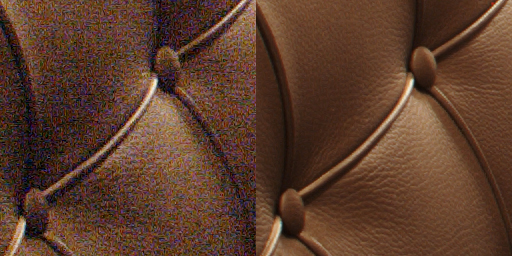
I wrote an article about this: Zero noise photography.
BRLast edited by _GUI_; 4th May 2008 at 02:44 PM.
-
4th May 2008, 05:46 PM #7
- Join Date
- May 2008
- Location
- Blyth, Northumberland, NE England
- Posts
- 25
Re: Averaging Images to Reduce Noise Not Working...?
True, the question is whether the detail loss is observable. Originally Posted by _GUI_
Of course, the kind of photography matters too - I'm a "mobile" bird photographer, and birds rarely stay perfectly still long enough to allow for multiple identically-framed images..!

It's an impressive example in your post though - thanks for that.
-
5th June 2008, 07:41 AM #8New Member
- Join Date
- Jun 2008
- Posts
- 6
Re: Averaging Images to Reduce Noise Not Working...?
Having different exposures and blending to remove noise is one way. Averaging multiple identical exposures does reduce noise and eek out more detail. I find 4 exposures works well and can be "Stacked" in PS.
Base layer at 100% opacity, 2nd at 50%, 3rd at 33%, 4th at 25% etc.
Si

 Reply With Quote