
I think I finally understand levels and tone curve. I have yet to play with those.
However, I am confused by the fact that whatever you can do with levels can also be achived by tone curve (which is a more complete tool to say the least).
now, if you play with both (let's say you adjust levels first, but figure you need to refine in the midtone for instance), then what exactly will the tone curve start with ? (esepcially since there you also can change the input levels...
Thanks
Vincent
 Helpful Posts: 0
Results 1 to 4 of 4
-
17th May 2008, 08:31 PM #1


- Join Date
- Apr 2008
- Location
- Raleigh (NC/US), Paris
- Posts
- 183
Replicating levels adjustments using the curves tool
-
17th May 2008, 08:46 PM #2Administrator
- Join Date
- Apr 2008
- Location
- California, USA
- Posts
- 1,473
- Real Name
- Sean
Re: Replicating levels adjustments using the curves tool
If I understand this correctly, you want to (1) adjust the photoshop levels tool and then (2) refine the midtone using the photoshop curves tool. Is this correct?
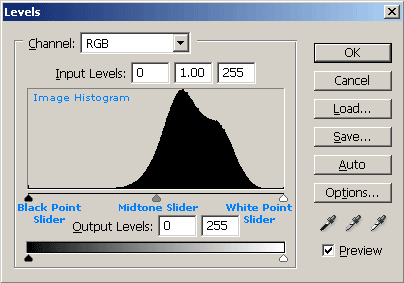
First, avoid too many separate uses of levels/curves if you can to avoid unnecessary image posterization (although this is usually not a problem if you are using 16-bit images). Both steps could be performed using the levels tool if you used the midtone slider.
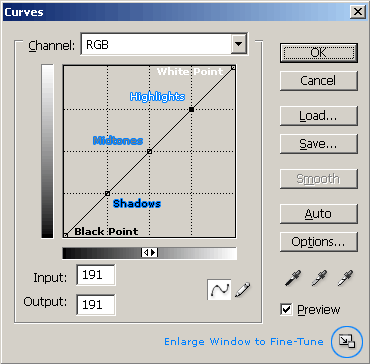
Second, the curves tool displays a curve which represents how input tones are mapped to output tones. The key here is that the input tones are those from the image prior to loading the tool, meaning that these already account for changes AFTER the levels tool has been applied. The curves tool will start therefore start with a straight line as its tone curve-- no matter what levels you have applied prior to that.
Finally, if you are asking how to replicate what you did in levels using the curves tool alone, this can be done by dragging the endpoints of the curve either straight up/down or left/right, depending on whether you moved the white point and black point sliders below the "Output Levels" or "Input Levels" in the levels tool. Similarly, moving the midpoint of the curve is equivalent to moving the midtone slider in levels.
-
18th May 2008, 12:04 AM #3
- Join Date
- Apr 2008
- Location
- Raleigh (NC/US), Paris
- Posts
- 183
Re: Replicating levels adjustments using the curves tool
All right, so I went through the tutorials again.
it sounds like the level tool will modify input tones whereas the curve tool will change the input to output mapping, which is pretty much the same I would think, just that the level "remapping" will happen prior to the final curve remapping.
so if I slide the black point to 20, and in the curve, I remap 20 to 0 (something like what you have in the tutorial, but leaving the mid to high point in the straight diagonal)
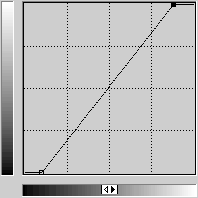
Then effectively, it's as if I applied a black point of 40 with a tone curve set to normal straight diagonal. (well, assuming the stretching of the histogram from the black point to the midpoint is linear)
is that correct? or should I go back to school?
Thanks
vincent
-
19th May 2008, 11:50 PM #4Administrator
- Join Date
- Apr 2008
- Location
- California, USA
- Posts
- 1,473
- Real Name
- Sean
Re: Replicating levels adjustments using the curves tool
Yep, I think you've got it. One clarification is that, just like the curves tool, the levels tool also changes the input->output mapping (which is equivalent to applying a "curve" to the image behind the scenes...even if you do not see it in a diagram). The curves and levels tools are really the same thing; curves just gives you more sliders (control points) to play with, and lets you move them in any direction.
Also, levels will always be equivalent to a linear curve if you only use the black and white point sliders; using the midpoint slider in levels will always make the curve/remapping non-linear...just as moving the midtone control point in the photoshop curves tool.

 Reply With Quote